Last updated: October 23, 2026
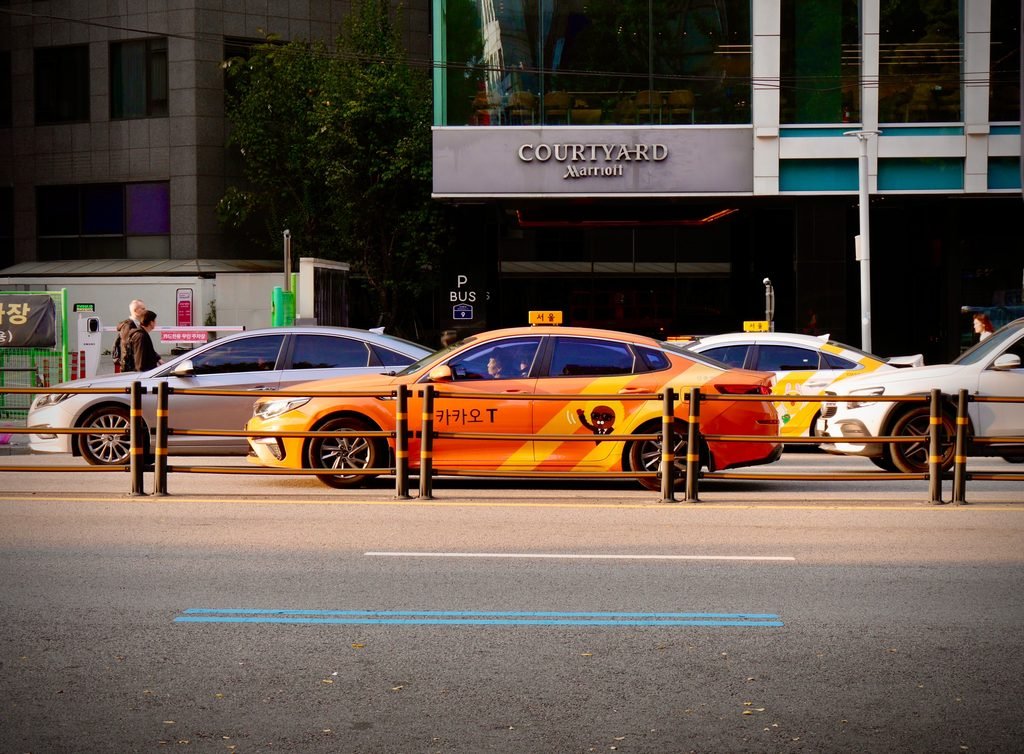
It’s 11:40 p.m. in Seoul, the last train on your line is gone, and the taxi meter you’re about to start runs 40% higher than it did at dinner. A regular Seoul taxi starts at ₩4,800 in the daytime, but between 11 p.m. and 2 a.m. the base fare jumps to ₩6,700. That’s the moment most visitors try to open a taxi app, and the moment they find out the one every Korean uses wasn’t built with them in mind.
This guide covers Kakao T for foreigners: how to sign up from the US, how to pay with an American card, which taxi type to pick, and when Kakao’s own foreigner app, K.Ride, or Uber is simply the easier route.
Quick Answer: Taxi Apps in Korea in 60 Seconds
- Kakao T is the main app. Almost every taxi in Korea takes Kakao T calls. It has an English setting, and Kakao says foreign Visa, Mastercard, JCB, and Amex cards work for taxi rides.
- Sign-up is the hard part. You need a Kakao account and phone verification. Some US numbers pass, some don’t. Set it up at home, not at the airport.
- No card? You can still ride. Choose “direct payment” on a regular call and pay the driver by card or cash at the end.
- K.Ride is Kakao’s app for visitors. Easy sign-up with Google, Apple, or email, but it only offers the pricier taxi types and adds about a 10% service fee.
- Uber works too, with your existing US account. In Korea it books licensed taxis, not private cars.
- No tipping. The meter fare is the fare.
- Airport: use the official taxi stand, or book an International Taxi with a flat fare of ₩70,000 to ₩140,000 to Seoul.
Why Korea Runs on One Taxi App
In New York, you can raise your hand for a yellow cab, open Uber, or open Lyft, and the three compete for the same ride. Seoul works differently. Ride-sharing with private cars, the model Uber and Lyft are built on at home, isn’t how Korea’s market runs. Nearly every app ride here is a licensed taxi with a meter, and one company dominates the booking side. Korea’s Fair Trade Commission has put Kakao T’s share of taxi-hailing at around 95%.

From a local’s point of view, that makes Kakao T less an app choice and more a utility. Drivers keep it on all day. Friends send each other the car number from it. If you stand on a corner in Gangnam at midnight, you’ll see empty taxis drive past because they’re heading to a pickup someone booked in the app. Street hailing still works, but late at night it gets harder, and the app is the reason.
The good news for visitors is that every app below books the same kind of car: a licensed, metered taxi with a fare set by the city. What changes between apps is how you sign up, how you pay, and what fees sit on top of the meter.
Can Foreigners Use Kakao T? What Works in 2026
Here’s what Kakao’s own help pages say, and where travelers get stuck.
Sign-up. Kakao T uses a Kakao account (the same one behind KakaoTalk), and then asks you to verify a phone number. Kakao doesn’t publish a rule that the number must be Korean, but verification with a foreign number is the step where many visitors fail. Some US numbers get the text and pass; others never see the code.
Language. The app supports Korean, English, and Japanese. Switch it in the app’s settings. Some labels and many place names stay in Korean.
Foreign cards. Kakao’s payment help page lists cards issued outside Korea (Visa, Mastercard, JCB, and American Express) as accepted for taxi, bike, and pet rides. Two catches: the name on the card must match the name on your Kakao T account, and some card issuers still block the registration. The same page doesn’t confirm foreign cards for every premium tier, so check in the app.
Direct payment. If your card won’t register, pick “direct payment” (직접결제) when you call a regular taxi. You then pay the driver at the end with a card, T-money, or cash. Kakao notes that this option exists only for regular calls.
How to Call a Taxi with Kakao T, Step by Step
- Install before you fly. Set up Kakao T at home, on Wi-Fi, while your US SIM can still receive texts easily.
- Create or log in to a Kakao account. If you already use KakaoTalk, use that account.
- Verify your phone. Use your US number with the +1 country code. If the code never arrives, try again once, then fall back to K.Ride or Uber.
- Switch to English in the app’s settings.
- Add a card under My Info, then Payment Methods. Use a card with no foreign transaction fee, since every ride is a foreign purchase. [AFFILIATE: no-foreign-transaction-fee credit card]
- Set your destination. English search works for big landmarks, but small cafes and guesthouses are easier to find by copying the Korean name or address from Naver Map and pasting it in.
- Check the pickup pin. GPS drifts between tall buildings. Drag the pin to the exact corner you’re standing on.
- Pick a taxi type and call. Start with a regular taxi (more on types below).
- Ride. The app shows the car number and color. When you arrive, the fare is charged to your card automatically, or you pay the driver if you chose direct payment.
The doors aren’t automatic, by the way. You open and close them yourself, like in New York.
Kakao T Taxi Types, Explained
The app offers several tiers, and the names don’t explain much. This is what you’re choosing between in Seoul, based on the city’s official fare table.
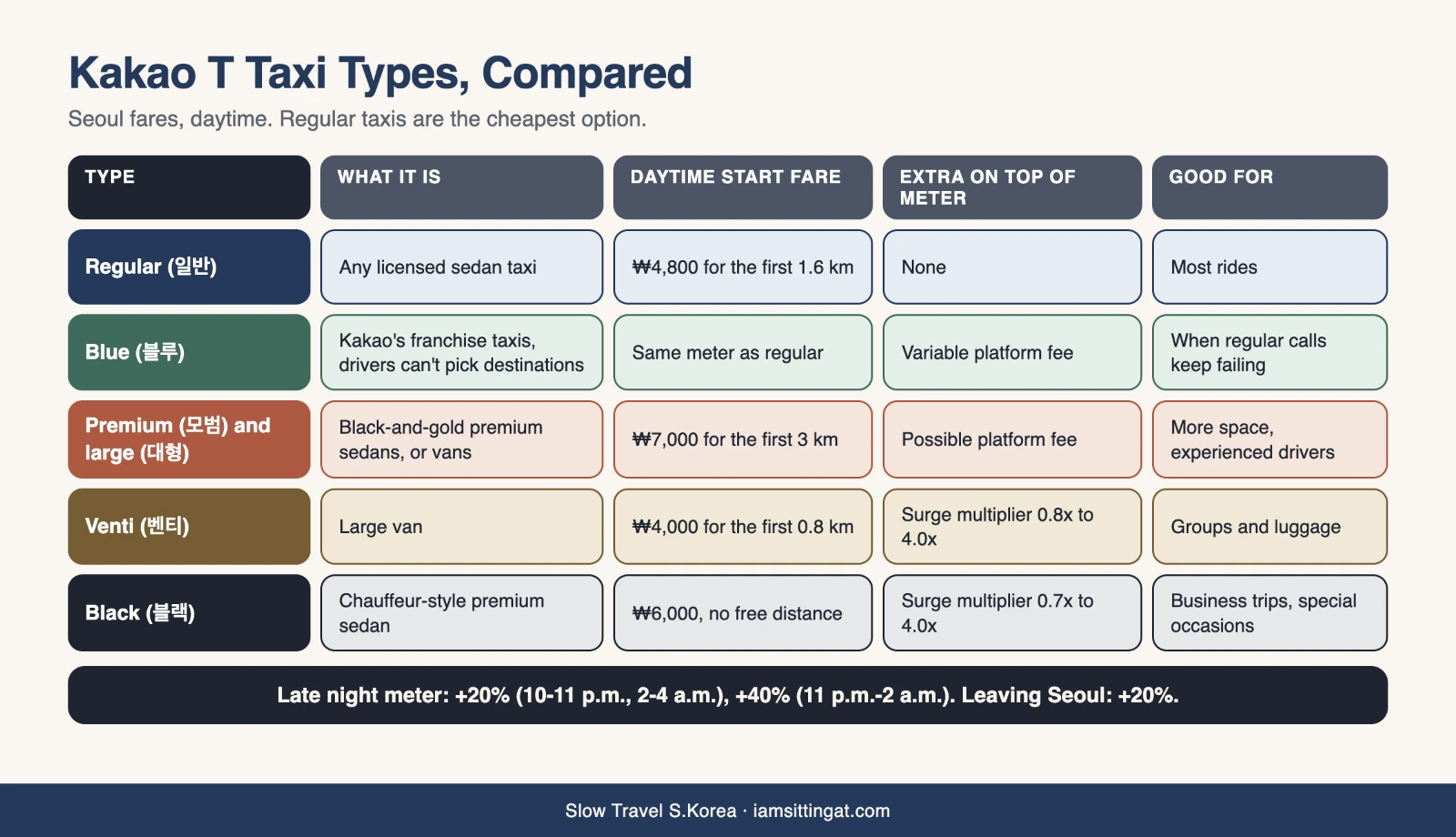
Late at night, a regular taxi’s meter runs 20% higher from 10 to 11 p.m. and 2 to 4 a.m., and 40% higher from 11 p.m. to 2 a.m. Leaving Seoul adds another 20%. Tolls are added to the fare.
Booster call. Between 10 p.m. and 3 a.m. in Seoul, Gyeonggi, and Incheon, Kakao T offers an optional booster call. You pay up to ₩4,000 extra, and the driver doesn’t see your destination until pickup, so short rides stop getting skipped. If you cancel more than a minute after a driver is assigned, there’s a ₩2,000 fee.
K.Ride vs Kakao T: Which One Should Visitors Use?
Kakao Mobility launched K.Ride in June 2024 for people who can’t get through Kakao T’s sign-up. It sends your request to the same Kakao taxi network, so the cars and drivers are the same. The differences are in the setup and the price.
What K.Ride does better:
- You sign up with your phone number plus a Google, Apple, or email account. No Kakao account needed.
- Foreign cards are the default. You register one before your first ride.
- You can search and chat with the driver in your own language, with automatic translation. The app lists support for over 130 languages.
- English customer support runs from 9 a.m. to 2 a.m. Korea time, inside the app.
What it costs you:
- No regular taxi. K.Ride offers four tiers: Standard (Kakao Blue), Comfort (Venti), Deluxe (premium taxi), and Luxury (Black). The cheapest regular call isn’t available.
- A service fee of about 10%. K.Ride’s posted terms add a 10% service fee on top of the fare, plus whatever flexible fee the tier carries. A ₩15,000 meter fare becomes about ₩16,500 before any Blue platform fee.
- Cancellation fees. Cancel more than a minute after a driver is assigned and you pay ₩2,000 for Deluxe, ₩4,000 for Comfort, or ₩5,000 for Luxury, plus the service fee.
- No pay-the-driver option. Everything goes through your registered card.
So in the K.Ride vs Kakao T question, my answer is simple: if Kakao T lets you verify your phone, use Kakao T and call regular taxis. If it doesn’t, K.Ride is the next best thing, and for a week-long trip the extra 10% on a few rides is a small price for a ride that shows up.
Uber and TABA: The Other Two Options
Uber. If Uber is already on your phone, it works in Korea with your US account and saved card. Here, Uber (renamed from UT to Uber Taxi in 2024) books licensed taxis, not private cars, so the ride is a metered Korean taxi. In-app message translation helps with drivers. Coverage is best in Seoul and other big cities, and it runs occasional deals on airport rides. Kakao has far more drivers, so wait times can be longer on Uber, especially outside the city center.
TABA. TABA is a taxi app for international visitors, built by a startup called Globaleur and supported by the Seoul Metropolitan Government and T-money. It launched in December 2023. You sign up with your phone number, Google, or Apple, and it takes a wide range of cards, including Visa, Mastercard, Amex, Discover, Diners Club, JCB, and UnionPay. It’s a reasonable backup inside Seoul.
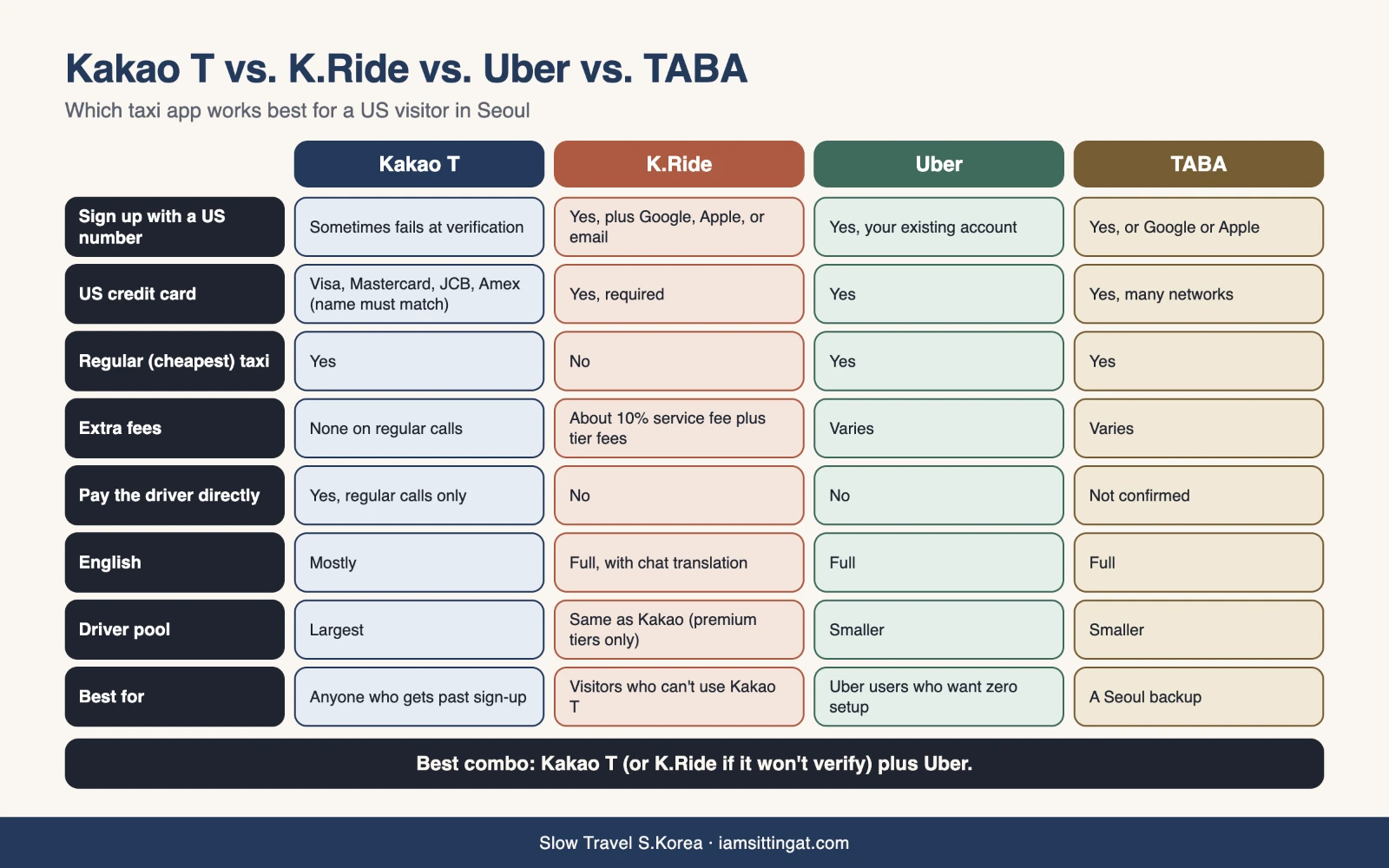
Kakao T vs K.Ride vs Uber vs TABA
Getting from Incheon Airport by Taxi
A regular taxi from Incheon Airport to Seoul runs on the meter plus tolls, so the total depends on traffic and where you’re going. Walk out of arrivals and use the official taxi stand. The airport itself warns about call vans posing as taxis and overcharging travelers, so skip anyone who approaches you inside the terminal.
If you want to know the price before you leave the curb, Seoul runs an International Taxi program for foreign visitors with English-, Japanese-, or Chinese-speaking drivers. Fares from Incheon Airport to Seoul are flat by district, with tolls included: ₩70,000 to ₩95,000 in a mid-size taxi, and ₩100,000 to ₩140,000 in a large or premium one. You can book at the desks in Terminals 1 and 2, by phone at 1644-2255, or online.
With light luggage, the train is cheaper than any taxi.
Reality Check: What Can Go Wrong

- Verification can fail. Kakao T’s phone check is the most common dead end for visitors. Have Uber or K.Ride installed as a backup before you land.
- Your card might not register. Even with Kakao listing foreign cards, some issuers block it, and the name on the card has to match your account. Direct payment on a regular call solves this.
- You need data and your US number. Sign-up codes come by text to your home SIM. Rides need mobile data. The simplest setup is your US line kept on for texts plus a Korea eSIM for data. [AFFILIATE: Korea eSIM]
- The pickup pin lies. Near big buildings and subway exits, double-check where the app thinks you are.
- Late nights are hard everywhere. Around Gangnam, Hongdae, and Itaewon after midnight, regular calls can go unanswered. Try a booster call, then Blue, then the street.
- K.Ride costs more. Premium tiers plus a 10% fee add up over a long trip.
- Disputes are clunky. If a fare looks wrong, screenshot the trip and contact support in the app right away. Keep the car number. Seoul’s 120 Dasan call center also takes taxi complaints.
- Don’t tip. Kakao T has an optional “thank-you tip” button on some tiers, but nobody expects it. Here’s why: Tipping in Korea
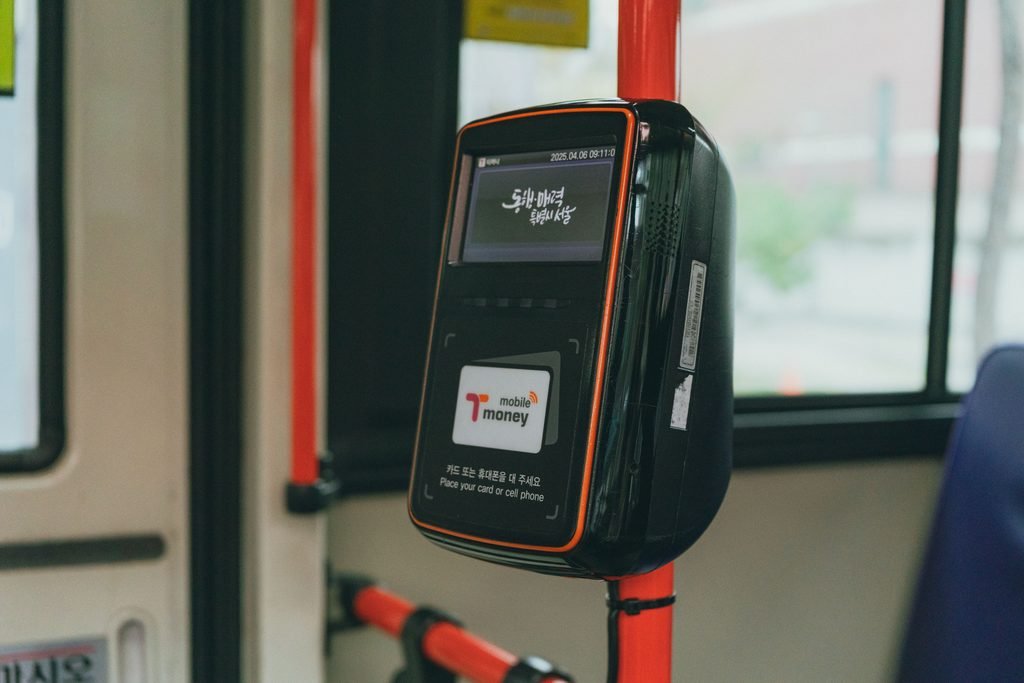
- A T-money card is a good fallback. Most taxis accept it when you pay the driver directly.
Which Taxi App Should You Use?
- You have KakaoTalk and can verify your number: Kakao T, regular calls.
- Kakao T verification fails: K.Ride, and accept the 10% fee.
- You already ride Uber in New York and want zero setup: Uber.
- You want a second backup in Seoul: TABA.
- You just landed with bags and want a fixed price: International Taxi from the airport.
My own setup suggestion for friends visiting from the US is two apps: Kakao T (or K.Ride if it won’t verify) plus Uber. Between them, you’ll almost always get a car. For the other apps worth having on your phone, see my list of Korea Travel Apps for Foreigners.
FAQ
Can foreigners use Kakao T without a Korean phone number?
Sometimes. Kakao T needs a Kakao account and phone verification, and many US numbers pass while others never receive the code. Set it up at home before your trip. If verification fails, K.Ride, Kakao’s app for visitors, signs you up with your phone number plus Google, Apple, or email.
Can I pay for Kakao T with a US credit card?
Yes, for taxi rides. Kakao lists foreign-issued Visa, Mastercard, JCB, and American Express cards, and the name on the card must match your account. If your card won’t register, choose direct payment on a regular call and pay the driver at the end.
What is the difference between K.Ride and Kakao T?
Both use the same Kakao taxi network. K.Ride is easier for visitors to sign up for and fully in English, but it only offers premium tiers (Blue, Venti, premium, and Black) and adds a service fee of about 10%. Kakao T has the cheaper regular taxi with no extra fee.
Does Uber work in Korea?
Yes. You can use your existing Uber account and card, and the app books licensed Korean taxis rather than private cars. It has fewer drivers than Kakao, so waits can be longer outside central Seoul.
Do you tip taxi drivers in Korea?
No. You pay what’s on the meter, plus tolls. Kakao T has an optional thank-you tip feature for some premium tiers, but it isn’t expected, and regular calls don’t even show it.
The Bottom Line
Kakao T for foreigners is a lot more workable in 2026 than it used to be: English menus, foreign cards, and a pay-the-driver option. The one real hurdle is phone verification, so set it up before you fly and keep a second app ready. If Kakao T won’t let you in, K.Ride gets you the same taxis for about 10% more, and Uber works with nothing new to set up. Whichever you use, check the pickup pin, keep a little T-money as backup, and don’t worry about tipping.